Wednesday, September 12, 2007

GUI Editor for MySQL 5

Most of PHP/MySQL programmers will use phpMyAdmin as an administration tools when managing MySQL database. I'm one of them but i get a difficulties when working with MySQL 5 routines (stored procedure and stored function). So, i'm looking an alternate GUI for managing MySQL database.

If you have a difficulties when create/edit/drop stored procedure when working with MySQL 5 then you can try to use GUI Tools from MySQL. You can try to use MySQL GUI Tools from http://dev.mysql.com/downloads/gui-tools/5.0.html

The MySQL GUI Tools Bundle for 5.0 includes the following products :
  1. MySQL Administrator 1.2
  2. MySQL Query Browser 1.2
  3. MySQL Migration Toolkit 1.1
This tools is easier to use. Below is the screen shot of MySQL Administrator when working with stored procedure

How to Get Result Set from MySQL 5 Stored Procedure using Classic ASP

For developer or programmer that worked on classic ASP, if you want to communicate with MySQL 5 then you need to install MySQL Connector/ODBC from MySQL official site. The MySQL Connector/ODBC is the name for the family of MySQL ODBC drivers (previously called MyODBC drivers) that provide access to a MySQL database using the industry standard Open Database Connectivity (ODBC) API.

You need to specify the correct DRIVER on your database connection string. The source code below is an example of how classic ASP work with MySQL 5 stored procedure.

For a note :

Default PORT for MySQL is 3306. I'm here using 3307 because i'm installed 2 versions of MySQL on my computer that MySQL 4.0.26 on port 3306 and MySQL 5.0.45 on port 3307.


<%@ Language=VBScript%>

<%
Option Explicit

Dim strConn, objConn
Dim strDBHost, strDBPort, strDBUser, strDBPassword, strDBName, blnConnStatus
Dim strSql, objRS
Dim strCustNumber, strInvNumber, strSPCode
Dim strMessage, sServer, sPort, sUser, sPassword

strDBHost = "localhost"
strDBPort = "3307"
strDBUser = "my_db_user"
strDBPassword = "my_db_password"
strDBName = "jmnsms"

strConn = "DRIVER={MySQL ODBC 3.51 Driver};SERVER=" & strDBHost & ";PORT=" & strDBPort & ";UID=" & strDBUser & ";PWD=" & strDBPassword & ";DATABASE=" & strDBName
blnConnStatus = False

Call OpenDBConn()

Response.Write "<h3>" & strMessage & "</h3>"

If blnConnStatus = False Then

Response.End()

End If

strSql = "CALL jmnsms.MB_SelectInvoice();"

Set objRS = Server.CreateObject("ADODB.Recordset")

objRS.Open strSql, objConn

If objRS.EOF Then

Response.Write "Data Not Found!"

Else

Do While NOT objRS.EOF

strCustNumber = objRS.Fields("cust_number")
strInvNumber = objRS.Fields("inv_number")
strSPCode = objRS.Fields("sp_code")

Response.Write strCustNumber & " -- " & strInvNumber & " -- " & strSPCode & "<br />"

objRS.MoveNext

Loop

End If

objRS.Close
Set objRS = Nothing

Call CloseDBConn()

'
' Procedure to Open Database Connection
'
Sub OpenDBConn()

Err.Clear()
On Error Resume Next

Set objConn = Server.CreateObject("ADODB.Connection")

If Len(Err.Description) <> 0 Then

strMessage = " " & Err.Description & " MySQL connection can't be established!"

Else

objConn.ConnectionTimeout = 120
objConn.Open strConn

If Len(Err.Description) <> 0 Then

strMessage = " " & Err.Description & " MySQL connection can't be established!"

Else

strMessage = " MySQL connection succesfull established!"
blnConnStatus = True

End If

End If

End Sub

'
' Procedure to Close Database Connection
'
Sub CloseDBConn()

objConn.Close
Set objConn = Nothing

End Sub

%>


The stored procedure called MB_SelectInvoice() is look like here

CREATE DEFINER=`root`@`localhost` PROCEDURE `MB_SelectInvoice`()
BEGIN
SELECT * FROM jmnsms.t_invoice;
END

Tuesday, August 07, 2007

What an IMSI and PLMN is ?

IMSI

The IMSI (International Mobile Subscriber Identity) is a unique 15-digit code used to identify an individual user on a GSM network.

The IMSI consists of three components:
  • Mobile Country Code (MCC)
  • Mobile Network Code (MNC)
  • Mobile Subscriber Identity Number (MSIN)
The IMSI is stored in the Subscriber Identity Module (SIM).

PLMN

Short for Public Land Mobile Network, a generic term for a mobile wireless network that is centrally operated and administrated by an organization and uses land-based radio frequency transmitters or base stations as network hubs. PLMNs can stand alone and interconnect with one another or connect to a fixed system such as the PSTN.

Cellular phones and mobile Internet access are two common uses of a PLMN.

Friday, August 03, 2007

The log file for database is full. Back up the transaction log for the database to free up some log space.

Don't panic. This error inform that the log file for your SQL Server database is full. If you're playing with Classic ASP then the error message would be appear like this below:

Microsoft OLE DB Provider for ODBC Drivers error '80040e14' [Microsoft][ODBC SQL Server Driver][SQL Server]The log file for database 'YOURDATABASENAME' is full. Back up the transaction log for the database to free up some log space.


To solve this problem simply open Query Analyzer and then run the command below:

BACKUP LOG yourdatabasename WITH TRUNCATE_ONLY
GO
DBCC SHRINKFILE (yourdatabasename_log,0)
GO


Then, make sure that you have a backup schedule in place to prevent the log file growth from getting out of hand. Backup the database, and then shrink the transaction log to free up log space.

You can setup a new maintenance plan. Go into Enterprise Manager -> Management, right click on Maintenance plan and choose New Maintenance plan.

Thursday, June 07, 2007

How to Check MDAC Version

There are two different ways to check which version of Microsoft Data Access Components (MDAC) is installed on your system
(1) Use the Component Checker tool.
(2) Check the version information that is stored in the registry.

Install and Use the Component Checker Tool

The most reliable way to determine which version of MDAC is installed is to compare the version number of each MDAC DLL file to a list of the DLL files that are shipped with each MDAC version. The Component Checker can help you to do this. It checks the files on the computer, compares them to a list from each version of MDAC, and reports the closest match.

To install Component Checker, follow these steps:
1. Browse to the following Microsoft Web site: http://www.microsoft.com/downloads/details.aspx?FamilyId=8F0A8DF6-4A21-4B43-BF53-14332EF092C9&displaylang=en
2. Click the link to download Component Checker. When you are prompted by the browser, save Cc.exe (a self-extracting executable file) to the desktop.
3. On the desktop, double-click Cc.exe; this extracts the Component Checker files and installs to the default location, C:\Comcheck.

To use Component Checker to check the MDAC version, follow these steps:
1. From the Start menu, click Run.
2. In the Open text box, type c:\comcheck\comcheck.exe and then click OK.
3. In the Component Checker - Choose Analysis Type dialog box, select Perform Analysis of your machine and automatically determine the release version, and then click OK.
4. The program attempts to identify the MDAC version on your computer by scanning all of the core MDAC files and registry settings. This process normally takes several minutes. When finished, you should receive the following message:

The MDAC version that is closest to the version on your computer is 'XXXX'.

5. Click OK.
6. A summary of the Component Checker scan appears. Note that the Dir, FileDescription, and FileSize errors can be safely ignored.

Check the Version Information Stored in the Registry


Because now Microsoft using a system to check whether you are using Windows Genuine Version or not like the image above, then if you're unable to get the Component Checker tool you can check the MDAC version in the registry. The version information is found in the following key: HKEY_LOCAL_MACHINE\Software\Microsoft\DataAccess\FullInstallVer

To check the registry, follow these steps:
1. On the Start menu, click Run.
2. In the Open text box, type regedit and then click OK; this starts Registry Editor.
3. In the Navigation pane, drill-down to the following path: HKEY_LOCAL_MACHINE\Software\Microsoft\DataAccess
4. In the Details pane, look in the Name column for FullInstallVer and Version. Each of these keys will have corresponding version information in the Data column.
5. When finished, click Exit on the Registry menu to close Registry Editor.

An example is shown in the image below


Reference :
(1) http://support.microsoft.com/default.aspx?kbid=301202&product=mdac

Thursday, May 17, 2007

Microsoft VBScript runtime error '800a000d' Type mismatch: 'objRegExp.Replace'

As you can see, the article title describes the error of VBScript runtime. Yes, that's right. This is the runtime error when i'm using classic ASP RegEx function. So, why we get this error ?

Microsoft VBScript runtime error '800a000d'
Type mismatch: 'objRegExp.Replace'

Don't worry, not all error is caused by our mistake on programming code. Sometimes the mistake are come from the NULL value from the database. So, you need to make sure that the value returned from the database is NOT NULL.

Below is the sample of classic ASP RegEx code :

Function stripHTML(strHTML)

'Strips the HTML tags from strHTML
Dim objRegExp, strOutput

'Ensure that strHTML contains something
If Len(strHTML) = 0 Then
stripHTML = strHTML
Exit Function
End If

Set objRegExp = New Regexp

objRegExp.IgnoreCase = True
objRegExp.Global = True
objRegExp.Pattern = "<(.|\n)+?>"

'Replace all HTML tag matches with the empty string
strOutput = objRegExp.Replace(strHTML, " ")

'Replace all <> with < and >
strOutput = Replace(strOutput, "<", "<")
strOutput = Replace(strOutput, ">", ">")

stripHTML = strOutput 'Return the value of strOutput

Set objRegExp = Nothing

End Function

Friday, April 13, 2007

Patching gnokii 0.6.14 for iTegno 3000 GSM Modem

Hi all. At this time i will share my experience on patching gnokii 0.6.14. Why we need to do a patch for gnokii 0.6.14 ?
Well, somebody are using iTegno 3000 GSM Modem or a device that known as a WAVECOM MODEM. And without using this patch then probably your smsd daemon won't work as expected. So, you still need this patch to make your AT Command working as you expected.

Simply editing file atgen.c (this file located at gnokii-0.6.14\common\phones\atgen.c)

Go to line 563 of your atgen.c file and you will find a code like this image below


Replace that code with the text like this image below


Go to line 1442 of your atgen.c file and you will find a code like this image below


Replace that code with the text like this image below


And all are already done. Please re-install your gnokii installation from the beginning with this new patch. Hope this article helps. Please read my another blog article about gnokii and iTegno 3000 GSM Modem on this site. It might help you too.

Saturday, April 07, 2007

Credit Card Verification

There are two verification system for the credit card. That is AVS and CVM.

1. AVS

AVS stands for Address Verification System. AVS is only available for the U.S. and partially available in four European countries. In the US, AVS checks if the cardholder's address and zip code matches the information at the card-issuing bank. AVS only uses the zip code and numeric portion of the billing street address. There are many reasons why AVS may fail (recent address change, AVS computers down, etc.). If the address verification fails on any level, the merchant may decline the transaction. If the AVS fails for any reason, the merchant should contact the customer for additional information (for example, the name of the issuing bank, the bank's toll-free telephone number, etc.).

The code will tell you whether or not the address given in the order actually matches that of the cardholder. On some system, the AVS code is comprised of three numbers. The first corresponds to the numbers in the street address. The second corresponds to the zip code. And the third is an overall verification of both. For example, an AVS code of YYY means: "yes" the address matches, "yes" the zip code matches and "yes," both the address and zip code match the cardholder's. But an AVS response code of NYZ means "no" the address does not match, "yes" the zip code matches and only the "zip" code matches.

Don't be fooled by YYY response codes. Some crooks have access to the cardholder's address information. Be observant and know what red flags to look for. Pay close attention to: the product ordered and order size; the e-mail address given; the ship-to address and shipping method requested among other things. Be suspicious of sizeable purchases that are being shipped to a different address, especially if express shipping is requested. Pay attention to whether or not the e-mail address given is valid. If the e-mail address is a person's name, check to see if it matches the cardholder's name. These, among other things, are all red flags to look for.

Below is the common AVS response code letters and their meanings :
Letter_ Meaning
Y_____ Exact Match
N_____ Not A Match
A_____ Address Match Only
Z_____ Zip Code Match Only
S_____ Service Not Supported (often for non-US credit cards, get proof from cardholder via fax if possible)
U_____ Address Information Not Available (call cardholder's issuing bank)
X_____ When with "YY" means exact match. Otherwise, "XXU" means address Information Not Available (call cardholder's issuing bank)
R_____ Retry - System Unavailable Or Timed Out
W_____ Zip Code OK
E_____ Error Response For Merchant Service Category Code

2. CVM

CVM stands for Card Verification Methods (VISA = CVV2, MasterCard = CVC2, and American Express = CID use a security code of 3 or 4 extra digits imprinted on the card, but not embedded or encrypted in the magnetic stripe. This verification code does not appear on credit card receipts. Since most fraudulent transactions result from stolen card numbers rather than the actual theft of the card, a customer that supplies this number is much more likely to be in possession of the credit card. VISA claims that the use of AVS with CVV2 validation for card-not-present transactions can reduce chargebacks by as much as 26%.

Tuesday, April 03, 2007

How To Find The Service Pack Version Installed On SQL Server

To determine the service pack that's installed on your SQL Server, open Query Analyzer. Connect to your server. Execute the following command:

SELECT @@VERSION
GO

The output of this command will be something like the one pasted below. The first line of the output displays the version number of the server. The last 3 digits (build number) of the version number are used to determine the service pack installed on your SQL Server. In this case 194.

Microsoft SQL Server 2000 - 8.00.194 (Intel X86)
Aug 6 2000 00:57:48
Copyright (c) 1988-2000 Microsoft Corporation
Developer Edition on Windows NT 5.1 (Build 2600: Service Pack 2)

Below are the SQL Server version list :

SP Version : 6.00.121
Product___ : SQL Server 6.0

SP Version : 6.00.124
Product___ : SQL Server 6.0

SP Version : 6.00.139
Product___ : SQL Server 6.0

SP Version : 6.00.151
Product___ : SQL Server 6.0

SP Version : 6.50.201
Product___ : SQL Server 6.5 (Hydra)

SP Version : 6.50.213
Product___ : SQL Server 6.5 (Hydra)

SP Version : 6.50.240
Product___ : SQL Server 6.5 (Hydra)

SP Version : 6.50.258
Product___ : SQL Server 6.5 (Hydra)

SP Version : 6.50.281
Product___ : SQL Server 6.5 (Hydra)

SP Version : 6.50.415
Product___ : SQL Server 6.5 (Hydra)

SP Version : 6.50.416
Product___ : SQL Server 6.5 (Hydra)

SP Version : 7.00.623
Product___ : SQL Server 7.0 (Sphinx)

SP Version : 7.00.699
Product___ : SQL Server 7.0 (Sphinx)

SP Version : 7.00.842
Product___ : SQL Server 7.0 (Sphinx)

SP Version : 7.00.961
Product___ : SQL Server 7.0 (Sphinx)

SP Version : 7.00.1063
Product___ : SQL Server 7.0 (Sphinx)

SP Version : 8.00.194
Product___ : SQL Server 2000 (Shiloh)

SP Version : 8.00.384
Product___ : SQL Server 2000 (Shiloh)

SP Version : 8.00.534
Product___ : SQL Server 2000 (Shiloh)

SP Version : 8.00.760
Product___ : SQL Server 2000 (Shiloh)

SP Version : 8.00.2039
Product___ : SQL Server 2000 (Shiloh)

SP Version : 9.00.1399.06
Product___ : SQL Server 2005 (Yukon)

Apart from SELECT @@VERSION, there are other commands too, that show you the build number. Try, sp_server_info and master..xp_msver. In SQL Server 2000, there is a new system function called SERVERPROPERTY, that returns service pack information. Here is an example:

SELECT SERVERPROPERTY('ProductLevel')
GO

Changing SQL Server Passwords

Most security experts recommendations include changing passwords frequently to enhance security. It is easy to change the password on a SQL Server Username via Query Analyzer. Changing the password with Query Analyzer makes it easy to coordinate changing the password on the database server at the same time as it is changed in the connection string. This approach provides the flexibility to change the password at the most appropriate time for the application.

To change the SQL Server Username password, just connect to the database with Query Analyzer using the SQL Server Username that is being updated and the current password. Then run "sp_password" to change the password.

Here is a simple example that changes the current password from "current_password" to "new_password" :

sp_password 'current_password', 'new_password'

If your first SQL Server installation use a blank password then you need this way to change the SQL Server password :

sp_password NULL, 'new_password'

Be sure to use a strong password, "new_password" is just an example. For a quick test to confirm that the new password is working, close Query Analyzer and then re-connect with the new password. That is all there is to it, except for changing your connections string. It is obvious, but still critical to remember to change the password in your connection string if this SQL Username is used in your code. Once the password has been changed and tested with Query Analyzer, update the connection string with the new password and test that everything still works correctly, and you're done.

Thursday, March 22, 2007

Using Server.HTMLEncode on Classic ASP

If you have an ASP pages that display strings stored in the database fields, you should always process the strings with the Server.HTMLEncode method, otherwise the string won't be displayed correctly in the user's browser if it contains characters that have a special meaning to HTML, such as the quote ("), the less-than (<) and greater-than (>) symbols, the ampersand symbol (&), and any character whose ANSI code is larger than 127.

It is easy to hardcode these things into our ASP script, but if these characters exist in your database, you need to dynamically encode them. To do so, apply the HTMLEncode method to your recordset data before it is sent to the response object:

Response.Write Server.HTMLEncode(rs.Fields("my_field"))

Other examples is:

<%
Dim sLink

sLink = "<a href="'http://www.printerspost.com.au'">Printers Post Australia</a>"

Response.Write "Not HTMLEncoded string: " & sLink & "<br/><br/>"
Response.Write "HTMLEncoded string:" & Server.HTMLEncode(sLink)

%>

Monday, March 19, 2007

DKU-5 vs CA-42 Data Cable

Hello all, now i want to explain the differences between Nokia DKU-5 and CA-42 data cable. Sometime we are confusing to choose a data cable for our Nokia Phone. There are DKU-5 and CA-42 data cable. I hope this article helping you who are decided to buy a Nokia data cable.

DKU-5

DKU-5 has a chip in it to emulate a serial port through the USB connector. This is for phones without native USB connectivity. DKU-5 is used for models without external memory (6100, 3100, 3120, 3200, 3220, 6610, 7210, 7250, 68xx, 6200, 6220).

CA-42

CA-42 is a replacement cable for DKU-5 cable. Some phones are compatible with both of them, some with just CA-42.

The main differences are three :
  1. The CA-42 cable consumes less power than the DKU-5 when it is idle.
  2. The CA-42 cable is not detected by the PC unless the phone is connected to the other end.
  3. The CA-42 cable can be also used in Operating Systems other than Windows 98/2K/XP, such as Windows CE, Linux and Mac.

Thursday, March 15, 2007

Session.LCID (LOCALE ID)

When we are developing a website using ASP script, sometime we had to format dates, numbers, currency, etc. by ourself. And relying on the version of Windows that was installed on the server, it is not good idea in case you moved sites from say The United States to a United Kingdom provider. With IIS4 and IIS5 (Windows NT4 and Windows 2000 respectively) you only need to set the LOCALE ID (Session.LCID) and everything is done for you. The Session.LCID is a read/write property, meaning you can assign a value to it as well as read its current value.

Session.LCID has session scope, which means you can just add one line of code to your global.asa file and ASP does the rest for you. Just remember that if you assign a new value to the Session.LCID it will override global.asa and will remain until a new value is set or the session is ended.

Below you can see locale id's for the US and the UK as well as how dates are formatted using these locales.

Session.LCID = 1033 'This is the English(United States) format.

Short Date : 3/15/2007
Long Date : Thursday, March 15, 2007
Time : 12:11:02 AM
Currency : $9.95

Session.LCID = 2057 'This is the English(British) format

Short Date : 15/03/2007
Long Date : 15 March 2007
Time : 00:11:02
Currency : Ј10.00

When working with databases, you will want to also set the format of the date field to correspond with the LCID that is being used in the script. You can do this by going into the design view and setting the format to dd/mm/yyyy or the format you are using.

Below is a table of the LCIDs, and the corresponding language that you have available:

LOCALE ID :

LCID____Language
-----------------------------
1078____Afrikaans
1052____Albanian
5121____Arabic(Algeria)
15361___Arabic(Bahrain)
3073____Arabic(Egypt)
2049____Arabic(Iraq)
11265___Arabic(Jordan)
13313___Arabic(Kuwait)
12289___Arabic(Lebanon)
4097____Arabic(Libya)
6145____Arabic(Morocco)
8193____Arabic(Oman)
16385___Arabic(Qatar)
1025____Arabic(Saudi Arabia)
10241___Arabic(Syria)
7169____Arabic(Tunisia)
14337___Arabic(U.A.E.)
9217____Arabic(Yemen)
1069____Basque
1059____Belarusian
1026____Bulgarian
1027____Catalan
3076____Chinese(Hong Kong)
2052____Chinese(PRC)
4100____Chinese(Singapore)
1028____Chinese(Taiwan)
1050____Croatian
1029____Czech
1030____Danish
2067____Dutch(Belgian)
1043____Dutch(Standard)
9_______English
3081____English(Australian)
10249___English(Belize)
2057____English(British)
4105____English(Canadian)
9225____English(Caribbean)
6153____English(Ireland)
8201____English(Jamaica)
5129____English(New Zealand)
7177____English(South Africa)
11273___English(Trinidad)
1033____English(United States)
1061____Estonian
1080____Faeroese
1065____Farsi
1035____Finnish
2060____French(Belgian)
3084____French(Canadian)
5132____French(Luxembourg)
1036____French(Standard)
4108____French(Swiss)
2108____Gaelic(Irish)
1084____Gaelic(Scots)
3079____German(Austrian)
5127____German(Liechtenstein)
4103____German(Luxembourg)
1031____German(Standard)
2055____German(Swiss)
1032____Greek
1037____Hebrew
1081____Hindi
1038____Hungarian
1039____Icelandic
1057____Indonesian
1040____Italian(Standard)
2064____Italian(Swiss)
1041____Japanese
1042____Korean
2066____Korean(Johab)
1062____Latvian
1063____Lithuanian
1071____Macedonian
1086____Malaysian
1082____Maltese
1044____Norwegian(Bokmal)
2068____Norwegian(Nynorsk)
1045____Polish
1046____Portuguese(Brazilian)
2070____Portuguese(Standard)
1047____Rhaeto-Romanic
1048____Romanian
2072____Romanian(Moldavia)
1049____Russian
2073____Russian(Moldavia)
1083____Sami(Lappish)
3098____Serbian(Cyrillic)
2074____Serbian(Latin)
1051____Slovak
1060____Slovenian
1070____Sorbian
11274___Spanish(Argentina)
16394___Spanish(Bolivia)
13322___Spanish(Chile)
9226____Spanish(Colombia)
5130____Spanish(Costa Rica)
7178____Spanish(Dominican Republic)
12298___Spanish(Ecuador)
17418___Spanish(El Salvador)
4106____Spanish(Guatemala)
18442___Spanish(Honduras)
2058____Spanish(Mexican)
19466___Spanish(Nicaragua)
6154____Spanish(Panama)
15370___Spanish(Paraguay)
10250___Spanish(Peru)
20490___Spanish(Puerto Rico)
3082____Spanish,Spain-Modern Sort
1034____Spanish(Spain - Traditional Sort)
14346___Spanish(Uruguay)
8202____Spanish(Venezuela)
1072____Sutu
1053____Swedish
2077____Swedish(Finland)
1054____Thai
1073____Tsonga
1074____Tswana
1055____Turkish
1058____Ukrainian
1056____Urdu
1075____Venda
1066____Vietnamese
1076____Xhosa
1085____Yiddish
1077____Zulu
2048____default

Tuesday, December 26, 2006

Gnokii : Upgrade From Nokia 5110 To iTegno 3000

(1) Backup your current ~/.gnokiirc file for Nokia 5110 to the safe place.

(2) Put in SIM Card to the iTegno modem and closed it well.

(3) Put in RS232 iTegno port to the PC and put in the modem Adapter to the electrical power.

(4) Modem will be lightening. Wait for a second and in a second the modem would be flicker and then as simultaneous the modem indikator light would be flickering.

(5) Login as root and extract gnokii-0.6.14.tar.bz2 files to the folder /usr/local/src with this command :

tar xjvf /media/cdrom/gnokii/gnokii-0.6.14.tar.bz2 –C /usr/local/src

(6) Go to the new extracted gnokii source directory gnokii with this command :

cd /usr/local/src/gnokii-0.6.14

(7) Do this step one by one to install new gnokii and have a look if this process successfull or not :

./configure --prefix=/usr/local
make
make install
make install-docs

(8) After step (7) done, copy .gnokiirc file to the root home folder.

cp /media/cdrom/gnokii/.gnokiirc ~/.

For the content of .gnokiirc file, please have a look on my previous article configuring iTegno 3000 with gnokii

(9) You need to make sure that your gnokii version is a new version. Check with this command :

gnokii --version

(10) Now checking the modem to make sure the modem is recognized by gnokii.

gnokii --identify

(11) If the information below shown to you then your modem has been recognized by gnokii.

IMEI : 351621000201970
Manufacturer : WAVECOM MODEM
Model : MULTIBAND 900E 1800
Revision : 543_09gg.Q2406A 1364028 020305 19:10
Serial device: closing device

(12) The next step is installing minicom. Minicom is an important tools to check whether your modem is in the right functional.

dpkg –i /media/cdrom/minicom/minicom_2.1-9_i386.deb

(13) If there's another package then install it simultaneously with that minicom package.

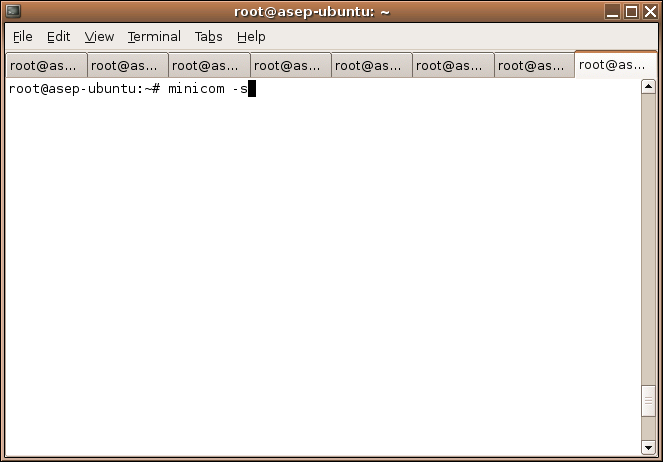
(14) The next step are operating the minicom. First, we need to setup minicom with the right serial baudrate and parity. Type in the linux console like this image below :


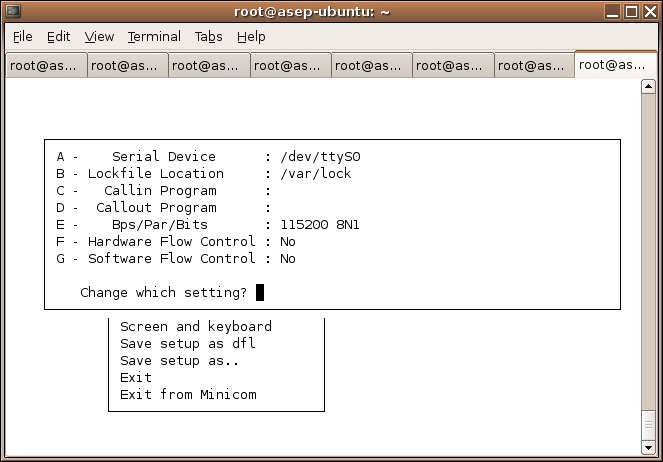
(15) Then you will be prompted with a menu like this image below. Choose Serial port setup.


(16) Put in the configuration / setting like this image below. And after all the configuration complete, press or key to exit from that menu.


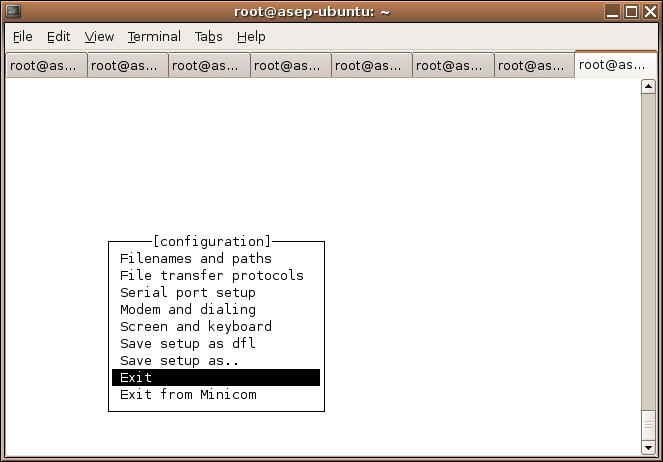
(17) Choose Exit menu to exit from minicom setting menu.


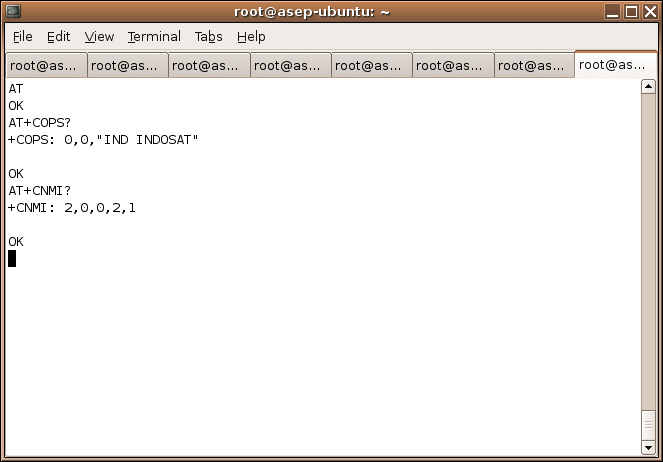
(18) You will be prompted to the screen where you are able to typing the AT command.


(19) Type AT
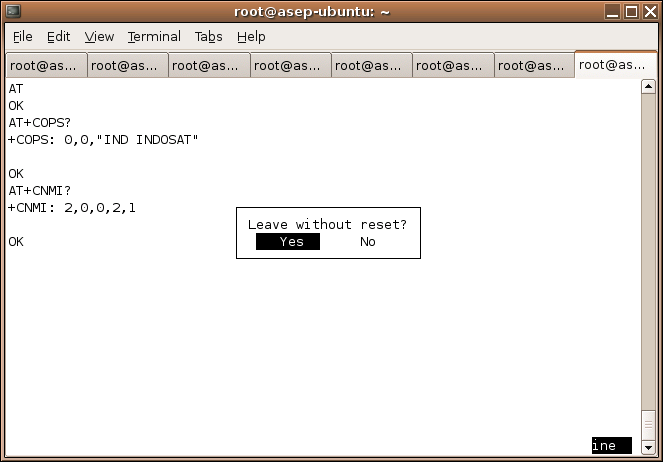
Type AT+COPS?

AT+COPS? use this command to get your provider.


Type AT+CNMI?

You need to make sure the value +CNMI: 2,0,0,2,1

If the value is different then you have to set the value with this command :
AT+CNMI=2,0,0,2,1

Save CNMI setting in your modem with this command :
AT&W

Check again whether +CNMI setting already 2,0,0,2,1
AT+CNMI?

(20) After finishing and +CNMI setting is right, press Ctrl-A then Z. Then you will be redirecting to the screen like this below.


(21) Choose Quit with no reset then you will be prompted to the screen :


(22) Choose Yes and you'll taken to linux terminal. Then you need to check if gnokii can sending sms or tidak. Type this command :

echo "sending sms from gnokii " | gnokii --sendsms +6285659969486 -r

(23) If in your SIM Card inbox already a sms, then check with this command below. This command very important to check whether gnokii can read the data from your SIM Card or not. If in this step not working then you must repeat gnokii installation from the beginning. To make sure if in your inbox already a sms or not, please send one sms to your SIM Card in your modem.

gnokii --getsms SM 1

If the final result is :

Received message type 12
GetSMS SM 1 failed! (Command failed.)
Serial device: closing device

Then, there is something wrong with your gnokii source.

(24) If there is no problem then we go to the next step to install smsd. Go to the smsd source directory.

cd /usr/local/src/gnokii-0.6.14/smsd
make
make install

(25) If there is no error then your smsd installation successfully complete. Go ahead to running up the smsd service manually to see the output on your linux console. Then try the application (for example : playsms).

(26) Finish.

Friday, December 22, 2006

Curriculum Vitae

Personal Information


Name : Asep Andria I.W., ST.
Gender : Male
Email : dataandria [at] yahoo [dot] com
Yahoo! ID : dataandria
Language : English


Work Experience


11 June 2008 - Now : PT. Surya Citra Media Tbk. - A Holding Company of SCTV, Jakarta, Indonesia as a Senior Internet Programmer
21 March 2007 - 26 May 2008
: Printers Post Pty Ltd, Sydney, Australia as a Computers Programmer
November 2006 - 20 March 2007 : Printers Post Pty Ltd, Sydney, Australia as a Computers Programmer (Part Time Employee)
4 April 2005 - 20 March 2007 : Akur Pratama, PT. (a.k.a Yogya Group), Bandung, West Java, Indonesia as a Developer
10 December 2001 - 25 March 2005 : Konsep Dot Net, PT., Bandung, West Java, Indonesia as a Programmer
Year 2001 : www.inidia.com, Bandung, West Java, Indonesia as a Programmer
Year 1999 - 2000 : Dagonet Cyber Café, Bandung, West Java, Indonesia as a Network Administrator
Year 1999 - 2000 : STMIK PMBI Computer Laboratory, Bandung, West Java, Indonesia as a Technical Assistant
Year 1999 : Networking Studio, Bandung, West Java, Indonesia as a Network Administrator
Year 1998 - 1999 : STMIK PMBI Computer Laboratory, Bandung, West Java, Indonesia as a Technical Assistant


Expertise & Technical


1. Programming Language
- PHP
- Classic ASP
- ASP.Net (VB.Net, C#.Net)
- Java/JSP/Servlet
- Python
- HTML, DHTML, CSS & Java Script
- Borland Delphi
- Visual Basic
- Oracle Form Developer

2. Database
- MySQL
- Oracle
- MS SQL Server
- MS Access
- PostgreSQL
- SQLite

3. Reporting Tools
- Oracle Form Report
- Crystal Reports

4. Web/Application Server
- Apache HTTPD
- IIS
- Apache Tomcat

5. Operating System
- Linux
- Microsoft Windows

6. Foreign Language
- English


IT Projects Experience


ERP (Enterprise Resource Planning)


Year : 2002 – 2004
Project Name : Kurnia Mineral – ERP
Client Name : PB. Kurnia (now PT. Kurnia Artha Pratiwi), Padalarang - Indonesia
Description : Build a web based Intranet Application including Sales, Procurement, Inventory, Finance, and Accounting
Technology : Slackware Linux 8.0, PHP, JpGraph, MySQL, Java Script, DHTML
Url : -

ASSET MANAGEMENT


Year : 2005 – 2006
Project Name : PRASS (PPBJ, PO, Receiving, Assets)
Client Name : Akur Pratama, PT. a.k.a Yogya Group, Bandung - Indonesia
Description : Asset Management including User Request Form and Purchase Order
Technology : Fedora Linux Core 2, PHP, Oracle 10g, Java Script
Url : -

FINANCE


Year : 2005
Project Name : A/R (Account Receivable)
Client Name : Konsep Dot Net, PT., Bandung - Indonesia
Description : Provide Data & A/R (Account Receivable) Analysis
Technology : Fedora Linux Core 3, JSP, Servlet, MySQL, Java Script
Url : -

RETAIL SYSTEM


Year : 2006
Project Name : YRS (Yogya Retail System)
Client Name : Akur Pratama, PT. a.k.a Yogya Group, Bandung - Indonesia
Description : Build an Application Integration for Retail System
Technology : Red Hat Enterprise Linux AS 4, Oracle Form Developer, Oracle Form Report, Oracle 10g
Url : -

PURCHASING SYSTEM


Year : 2003
Project Name : Bratatex
Client Name : Bratatex, PT, Bandung - Indonesia
Description : Involve on Analyzing OLAP Application
Technology : ASP, SQL Server, OLAP
Url : -

PRODUCTION & PACKAGING SYSTEM


Year : 2007
Project Name : Production & Packaging System
Client Name : Adira Semesta Industry, PT., Bandung - Indonesia
Description : Production & Packaging System (Software & Hardware)
Technology : PHP, AJAX, JavaScript, MySQL, Delphi, Scanner Control Unit, Remote Terminal Unit
Url : -

CUSTOMER CARE & BILLING SYSTEM


Year : 2008
Project Name : XL Traffic Info Trouble Ticket System
Client Name : PT Excelcomindo Pratama, Tbk., Jakarta - Indonesia
Description : Customer Support application for XL Traffic Info
Technology : Linux, PHP, MySQL, Java Script
Url : -

Year : 2007
Project Name : Tiny CCBS
Client Name : Jogja MediaNet, Yogyakarta - Indonesia
Description : Maintenance and Update Billing System for MediaNet Branch
Technology : Linux, PHP, MySQL, Java Script
Url : -

Year : 2007
Project Name : M2N CCBS
Client Name : Jogja MediaNet, Metro MediaNet, Yogyakarta - Indonesia
Description : Maintenance and Update Customer Care Billing System
Technology : Linux, PHP, MySQL, Java Script
Url : -

Year : 2007 - 2008
Project Name : JMN CCBS
Client Name : Jogja MediaNet, Yogyakarta - Indonesia
Description : Maintenance and Update Customer Care Billing System
Technology : Linux, PHP, MySQL, Java Script
Url : -

Year : 2006
Project Name : Corbec Billing CDR
Client Name : CORBEC Communication, PT., Jakarta - Indonesia
Description : Build a Billing Application based on CDR
Technology : Windows 2000 Server, PHP, MS SQL Server, Java Script
Url : -

SMS GATEWAY


Year : 2006
Project Name : MediaNet Sms Application
Client Name : Jogja MediaNet, Yogyakarta - Indonesia
Description : Build a sms gateway application for an Internet / Data Cable Provider
Technology : Fedora Linux Core 3, PHP, MySQL, Java Script, Gnokii, Nokia 5110, iTegno 3000
Url : -

Year : 2006
Project Name : GBIKA Sms Application
Client Name : GBI Keluarga Allah, Solo - Indonesia
Description : Build a sms gateway application for a church
Technology : Ubuntu Linux 5.10, PHP, MySQL, Java Script, Gnokii, Nokia 5110, iTegno 3000
Url : -

SECURITY & NETWORK CAMERA


Year : 2006
Project Name : GBIKA NCMS Application
Client Name : GBI Keluarga Allah, Solo - Indonesia
Description : Build an intranet network camera management system
Technology : Windows XP SP 2, PHP, MySQL, Java Script, Panasonic WV-NM100, DVR System
Url : -

FAIR VISITOR REGISTRATION


Year : 2004
Project Name : Bandung International Textile 2004
Client Name : Peraga Nusantara Jaya Sakti, PT, Jakarta - Indonesia
Description : Registration & Visitor Statistic (On-Site)
Technology : Windows 2000 Server, PHP, MySQL, Java Script
Url : -

Year : 2003
Project Name : Indonesian Pharmaceutical 2003
Client Name : Peraga Nusantara Jaya Sakti, PT, Jakarta - Indonesia
Description : Registration & Visitor Statistic (On-Site)
Technology : Windows 2000 Server, PHP, MySQL, Java Script
Url : -

Year : 2002
Project Name : Bandung International Textile 2002
Client Name : Peraga Nusantara Jaya Sakti, PT, Jakarta - Indonesia
Description : Build a system that handles a Registration & Visitor Statistics (On-Line, On-Site)
Technology : Windows 2000 Server, PHP, MySQL, Java Script
Url : -

Year : 2002
Project Name : Indonesian Pharmaceutical 2002
Client Name : Peraga Nusantara Jaya Sakti, PT, Jakarta - Indonesia
Description : Build a system that handles a Registration & Visitor Statistics (On-Site)
Technology : Windows 2000 Server, PHP, MySQL, Java Script
Url : -

E-COMMERCE, PORTAL AND CMS (Content Management System)


Year : 2008
Project Name : Avatar
Client Name : Teleakses Solusindo, PT., Bandung - Indonesia
Description : Create Avatar System for mobile telecommunication industry
Technology : PHP, MySQL, Javascript, AJAX, GraphicsMagick, FFMpeg
Url : -

Year : 2008
Project Name : GBIKA Re-Design
Client Name : GBI Keluarga Allah, Solo - Indonesia
Description : Official Site for GBI Keluarga Allah
Technology : PHP, MySQL, Javascript
Url : -

Year : 2007 - 2008
Project Name : Printers Post Auction
Client Name : Printers Post Pty Ltd, Sydney - Australia
Description : Moving system to adopt online auction system
Technology : Classic ASP, MS SQL Server, XHTML 1.0 Strict, CSS 2.0, 508 Accessibility, Javascript
Url : -

Year : 2007
Project Name : MediaNet Wizard
Client Name : Jogja MediaNet, Yogyakarta - Indonesia
Description : Official site, Web Generator, Templating System for MediaNet Services
Technology : PHP, MySQL, Javascript
Url : -

Year : 2007
Project Name : CMYK Directory
Client Name : BooDesign, Sydney - Australia
Description : Website for online printing and publishing directories
Technology : Classic ASP, MySQL Server, XHTML 1.0 Strict, CSS 2.0, 508 Accessibility, Javascript
Url : -

Year : 2007
Project Name : BooDesign Re-Design
Client Name : BooDesign, Sydney - Australia
Description : Company Profile
Technology : Classic ASP, MS SQL Server, XHTML 1.0 Strict, CSS 2.0, 508 Accessibility, Javascript
Url : -

Year : 2007
Project Name : Kodak Online Booking System
Client Name : Kodak Australia
Description : Maintenance & Update Booking System
Technology : .Net Framework 2.0, C#, MS SQL Server
Url : -

Year : 2007
Project Name : Balai Besar Keramik
Client Name : Balai Besar Keramik, Bandung - Indonesia
Description : Website for ceramics and related industry informations
Technology : PHP, MySQL
Url : -

Year : 2006 - 2007
Project Name : Printers Post - New and Used Printing Machines and Graphic Equipment and Services
Client Name : Printers Post Pty Ltd, Sydney - Australia
Description : Maintenance & migrating from an old HTML layout to be XHTML and CSS based layout
Technology : Classic ASP, MS SQL Server, XHTML 1.0 Strict, CSS 2.0, 508 Accessibility, Javascript
Url : -

Year : 2006
Project Name : DEPHAN File Management
Client Name : Departemen Pertahanan Republik Indonesia
Description : Build a File Management Application
Technology : PHP, MySQL, Java Script
Url : -

Year : 2005
Project Name : IT&S Intranet
Client Name : Akur Pratama, PT., Bandung - Indonesia
Description : Provide a professional technology and services to increase corporate user productivity
Technology : Fedora Linux Core 3, PHP, MySQL, Java Script
Url : -

Year : 2005
Project Name : KTA Online
Client Name : Konsorsium Telekomindo Aprotech
Description : Build a CMS (Content Management System)
Technology : PHP, MySQL, Java Script
Url : -

Year : 2004
Project Name : Konsep.NET Company Web
Client Name : Konsep Dot Net, PT. , Bandung - Indonesia
Description : Provide an information about company
Technology : PHP, MySQL, Java Script
Url : -

Year : 2003
Project Name : Pudak Scientific Product Catalogue
Client Name : Pudak Scientific, Bandung - Indonesia
Description : Product Catalogue (Content Management System)
Technology : Fedora Linux Core 3, PHP, MySQL, Java Script
Url : -

Year : 2002
Project Name : online.x-phones.com
Client Name : Konsep Dot Net, PT., Bandung - Indonesia
Description : Build a dynamic web that provide a Hand Phone Sales Online Order (Content Management System)
Technology : PHP, MySQL, Java Script
Url : -

Year : 2002
Project Name : www.textile.web.id
Client Name : Konsep Dot Net, PT, Bandung - Indonesia
Description : Build a dynamic web that provide an Indonesian Textile Portal (Content Management System)
Technology : PHP, MySQL, Java Script
Url : -

Year : 2002
Project Name : Product Catalogue
Client Name : Indosantosa, Bandung - Indonesia
Description : Build a dynamic web that provide a Product Catalogue & Online Order (Content Management System)
Technology : PHP, MySQL, Java Script
Url : -

Year : 2002
Project Name : www.harvest-works.com
Client Name : Harvest Indonesia, Bandung - Indonesia
Description : Build a dynamic web that provide a Product Catalogue & Online Order (Content Management System)
Technology : PHP, MySQL, Java Script
Url : -

Year : 2001
Project Name : www.inidia.com
Client Name : www.inidia.com, Bandung - Indonesia
Description : Build a dynamic web that provide a Statistics & Data Portal (Content Management System)
Technology : PHP, MySQL, Java Script
Url : -


Formal Education


Year 1997 - 2003 : STMIK Dharma Negara (previously known as STMIK PMBI), Bandung, West Java, Indonesia
Year 1994 - 1997 : SMUN 1 Ciamis, West Java, Indonesia
Year 1991 - 1994 : SMPN Buniseuri, Ciamis, West Java, Indonesia
Year 1985 - 1991 : SDN Muktisari, Ciamis, West Java, Indonesia


Non Formal Education


September 1999 : Supporting Windows NT, Networking Studio, Bandung, West Java, Indonesia
August 1999 : Novell Netware, Networking Studio, Bandung, West Java, Indonesia
July 1999 : Using Unix/Linux, Networking Studio, Bandung, West Java, Indonesia
June 1999 : Hardware and Networking, Networking Studio, Bandung, West Java, Indonesia

Thursday, December 21, 2006

DNS and DynDNS

I've installed an ADSL Internet connection on my home. Also i've an Apache web server installed on my PC and i want to publish my own web site over the internet without having to host to any webhosting services.

And now the question is "How to make my own site on my home PC can be accessed by other people out there over the internet ?"

You need a DynDNS. What is DNS ? What is DynDNS ?

The DNS (Domain Name System or Service) is a process that maps hostnames (how humans address servers) to IP addresses (how computers address servers). When you visted www.printerspost.com.au, your computer resolved that hostname as 202.60.65.31. This translation happens every time you access a website, FTP server, or an e-mail.

The Dynamic DNS allows you to alias a dynamic IP address like ADSL Internet connection to a static hostname in any of the domains, allowing your computer to be more easily accessed from various locations on the Internet. The Dynamic DNS service is ideal for a home website, file server, or just to keep a pointer back to your home PC so you can access those important documents while you're at work.

For a more information you can visit http://www.dyndns.com

Monday, December 04, 2006

TIMESTAMP or DATETIME on SQL Server 2000 ?

Mmm ... when you're working on SQL Server 2000 database and you want to choose a field type between timestamp or datetime, it may this article helping you on thinking about that datatype. Unfortunately you really can't use TIMESTAMP for any type of comparison. Or really for much of anything.

This is the quote from SQL Server Books Online :
The SQL Server timestamp data type has nothing to do with times or dates. SQL Server timestamps are binary numbers that indicate the relative sequence in which data modifications took place in a database. The timestamp data type was originally implemented to support the SQL Server recovery algorithms.

It further states Never use timestamp columns in keys, especially primary keys, because the timestamp value changes every time the row is modified.
It's very strange. The timestamp value changes every time the row is modified. So, it's better if you using a DATETIME or SMALLDATETIME column in this case. DATETIME columns can store dates from January 1st, 1753 through December 31st, 9999 (there's that Y10K problem) and are accurate to roughly 3 milliseconds. They use 8 bytes of storage. SMALLDATETIME columns can store dates from January 1st, 1900 through June 6th, 2079 and are accurate to the minute. SMALLDATETIME columns only use 4 bytes of storage.

You can insert values into DATETIME columns (or SMALLDATETIME) columns by enclosing them in quotes.

INSERT tblSales (salesDate) VALUES ('4/12/2006')

This will insert the date part with the time set to midnight (12:00:00 AM). You can insert the current system date and time using the GETDATE() function:

INSERT tblSales (salesDate) VALUES ( GETDATE() )

Your SELECT statement from above might look something like this:

SELECT * FROM tblSales WHERE salesDate = '2006-12-04'

This will run fine if you are putting dates in with no times. If you are adding times and want all the records for a particular day you can do something like this:

SELECT * FROM tblSales WHERE LEFT ( CONVERT ( varchar, salesDate, 120 ), 10 ) = '2006-12-04'

Using the CONVERT function makes SQL Server very picky about formats though (since that's what CONVERT does).

Saturday, November 25, 2006

Auto Increment Primary Key in MS SQL Server

MySQL database has a great functionality and one of them is auto_increment. How to make a field as an auto_increment field in SQL Server 2000 ?

The key is, set the table field to be an identity column.

You can do this in Enterprise Manager in the Design Table mode or through SQL Query Analyzer. The code below is the SQL sample to create an auto_increment field :

CREATE TABLE trel_user_menu
(
usermenu_id int IDENTITY(1,1)PRIMARY KEY CLUSTERED,
menu_id smallint NOT NULL,
user_nick varchar(16) NOT NULL,
usermenu_status tinyint NOT NULL
)

The 1's following the IDENTITY keyword indicate the SEED number (value for first record in table) and increment property (0 or 1).

Hope this helps.

Friday, November 03, 2006

Possible Reasons for +CMS ERROR: 302

It's possible if we are working with AT Command we could get the +CMS ERROR: 302. But what circumstances do I get +CMS ERROR: 302?

CMS ERROR 302 means "Operation not allowed".
Possible reasons for this error are :
(1) The service may be unavailable during that time.
(2) Service provider has locked the service.
(3) Corporate lock is active
(4) Module was powered off by +CPOF, CFUN=0, unplug, or Low battery level
(5) Service not correctly loaded
(6) SIM does not support SMSCB

Hope this helps.

Wednesday, November 01, 2006

Bash Script to Handling gnokii Daemon

Dear, if we are working with gnokii, sometimes after a few minutes gnokii got hang-up or the sms can not stored (save to the database) or can not send (get from the database and sent it out). So, we must stop the gnokii processed daemon and then start it again. But, i think it's a waste time if we are always stop and start it again. And the worst thing is we didn't know when the gnokii got hang-up. Below is my own bash script to handle this situation.


#!/bin/bash
#
# (c) Asep Andria I.W., ST.
# Email : <asep.andria@gmail.com>
# Mobile : +6285659969486

# ----------------------------------
# Check mysql.sock
# ----------------------------------

MYSQL_SOCK_DIR="/opt/lampp/var/mysql";
MYSQL_SOCK_NAME="mysql.sock";

if [ ! -x "$MYSQL_SOCK_DIR/$MYSQL_SOCK_NAME" ]; then

echo "Can not found $MYSQL_SOCK_NAME in $MYSQL_SOCK_DIR"
echo "Please check if MySQL Server is running or change the location of $MYSQL_SOCK_NAME"
echo "Exiting..."

exit 1

fi

# ----------------------------------
# Linking mysql.sock
# ----------------------------------

MYSQL_SOCK_LINK_DIR="/var/run/mysqld";
MYSQL_SOCK_LINK_NAME="mysqld.sock";

if [ ! -x "$MYSQL_SOCK_LINK_DIR/$MYSQL_SOCK_LINK_NAME" ]; then

echo "Can not found $MYSQL_SOCK_LINK_NAME in $MYSQL_SOCK_LINK_DIR"
echo ""
echo "Trying to linking $MYSQL_SOCK_DIR/$MYSQL_SOCK_NAME to $MYSQL_SOCK_LINK_DIR/$MYSQL_SOCK_LINK_NAME ..."

/bin/ln -s "$MYSQL_SOCK_DIR/$MYSQL_SOCK_NAME" "$MYSQL_SOCK_LINK_DIR/$MYSQL_SOCK_LINK_NAME"

if [ ! -x "$MYSQL_SOCK_LINK_DIR/$MYSQL_SOCK_LINK_NAME" ]; then

echo "Failed to linking $MYSQL_SOCK_DIR/$MYSQL_SOCK_NAME to $MYSQL_SOCK_LINK_DIR/$MYSQL_SOCK_LINK_NAME"

exit 1

else

echo "Success to linking $MYSQL_SOCK_DIR/$MYSQL_SOCK_NAME to $MYSQL_SOCK_LINK_DIR/$MYSQL_SOCK_LINK_NAME"

fi

fi

# ----------------------------------
# gnokii smsd path
# ----------------------------------
SMSD_PATH="/usr/local"

while true
do
killall smsd >/dev/null 2>&1
sleep 3
$SMSD_PATH/sbin/smsd -u usersms -d sms -c localhost -m mysql >/dev/null 2>&1 &
sleep 1m
done


Sometimes the mysql.sock location is differ from the os/machine to other. So, in the script above i tried to find the mysql.sock location. If exist ignore it but if not exist create a link one. We need this mysql.sock because gnokii didn't work if gnokii didn't find the mysql socket. Of course this script useful when you want to combine gnokii with MySql database.

Hope this script giving you a new inspiration.